
Bitcoin full node and query server
Jul 25, 2026
View in context in the libbitcoin Slack #general mirror.
33 replies · Kevin Ravensberg, evoskuil · last Jul 28, 2026

evoskuil01:21
About the same as mine. Can you run and report again with the following?
[bitcoin]
# only known block to this user is genesis.
milestone  = 000000000019d6689c085ae165831e934ff763ae46a2a6c172b3f1b60a8ce26f:0

[node]
# default maximum_concurrency is 50,000, so can just leave out.
maximum_concurrency = 50,000

# clean stop point for benchmark comparisons.
maximum_height = 950,000

# defaults to 0 (disabled) and this is a good typical size.
batch_signatures = 1,000,000

[database]
# the batch tables are disabled by default, so set initial capacity.
ecdsa_size =  100,000,000
schnorr_size = 10,000,000
prevalid_size = 1,000,000
(edited)
evoskuil01:23
Note that in new builds the _size settings will change to:
[table.ecdsa]
size = 100,000,000

[table.schnorr]
size = 10,000,000

[table.prevalid]
size = 1,000,000

Kevin Ravensberg23:05
It's running tonight, I'll report back tomorrow morning with the (improved) results!
❤️ 1
Kevin Ravensberg04:24
Seems to be stuck a few hundred blocks from 950000 now...
With this looping in the log:
2026-07-28T04:22:15Z.2 Accepted peer connection [xxx:34328] on binding [0.0.0.0:8333].
2026-07-28T04:22:15Z.5 Invalid heading magic (0x57cf7924) from [xxx:34328] possibly encrypted connection to clear endpoint.
2026-07-28T04:22:15Z.2 Inbound peer channel stop [xxx:34328] invalid message heading magic
evoskuil04:31
"Accepted peer connection" means that peers are connecting to you, which means the node is "recent" ("current" or at the max block) and has therefore enabled inbound connections.
"Invalid heading magic" means that the peer communication is invalid (the peer message header "magic" value is incorrect) and is therefore being dropped.
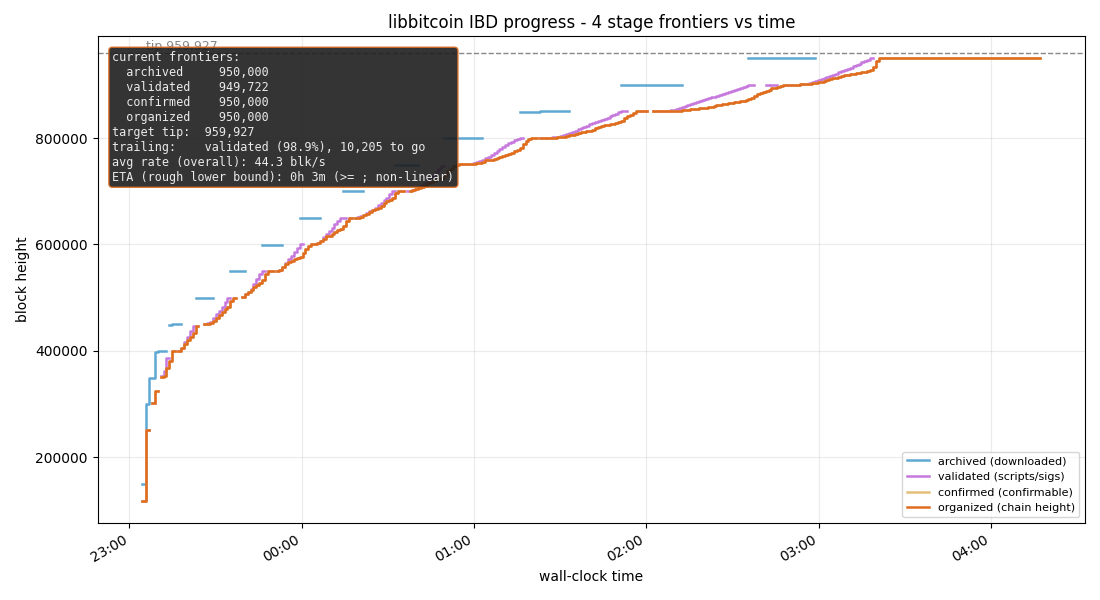
Seems to be stuck a few hundred blocks from 950000
I don't think so. It appears to have completed at around 3:20.
The plot's diagnostics are contradictory. If you set a max block of 950,000 then that's where it stopped. That's indicated in all three "frontiers" except "validated". The "target tip" will never be reached.
Check into your diagnostics regarding why validated is incorrect.
(edited)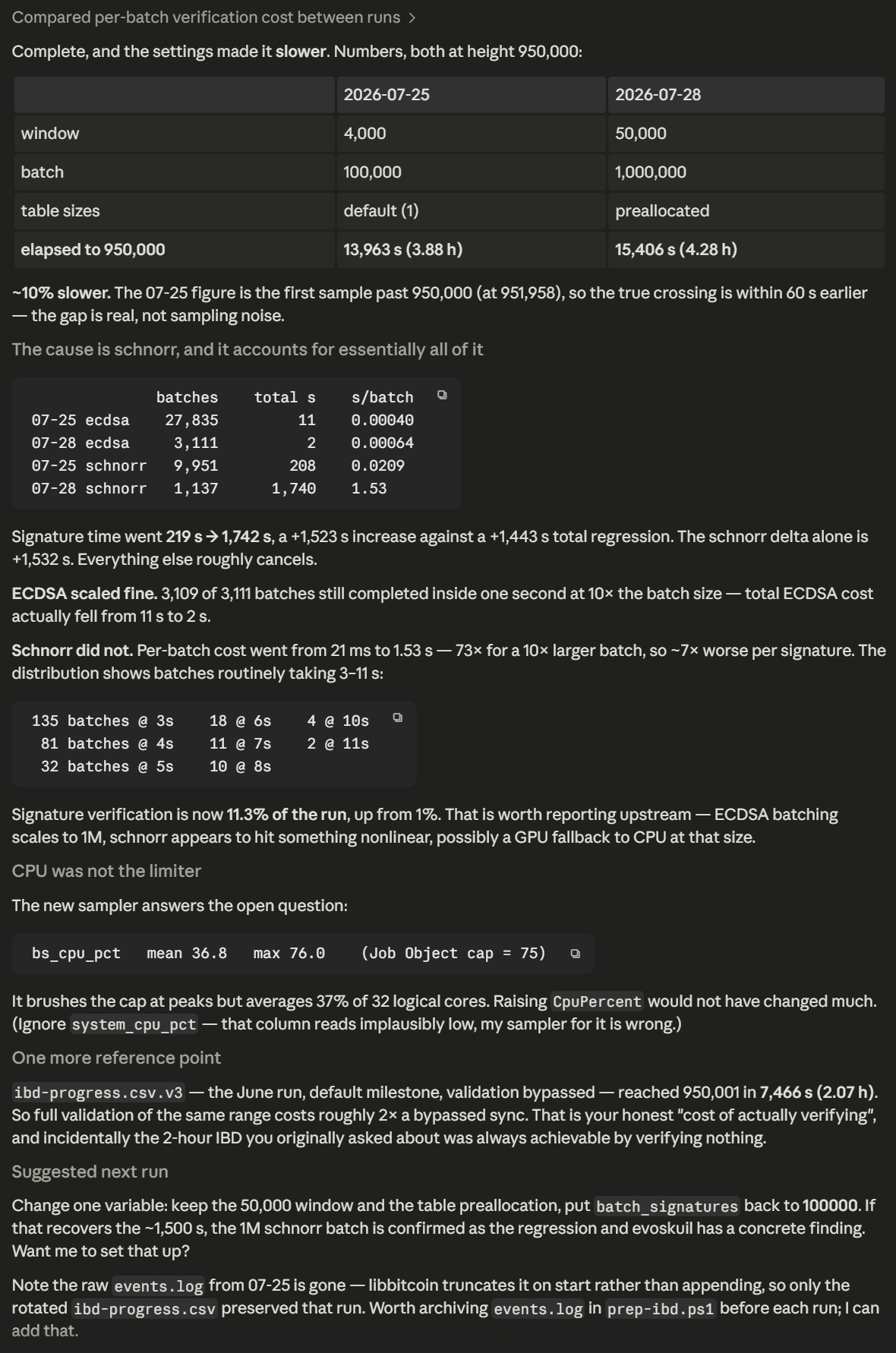
evoskuil04:43
Thanks!
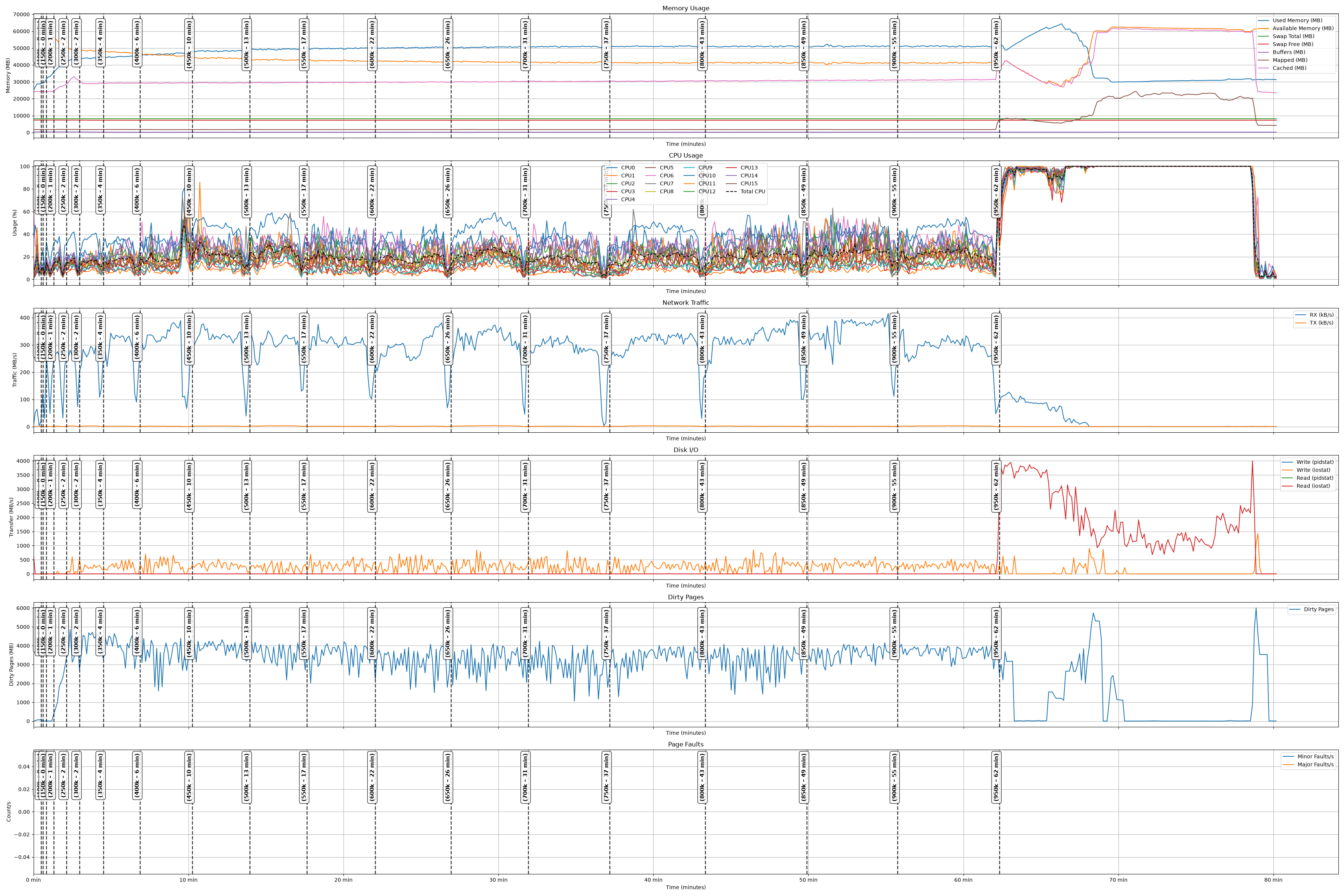
CPU should be the limiting factor on this machine/network, hitting 100% during most of validation. If it's not then the most likely culprit is I/O, so take a look at your SSD read speed during validation.
(edited)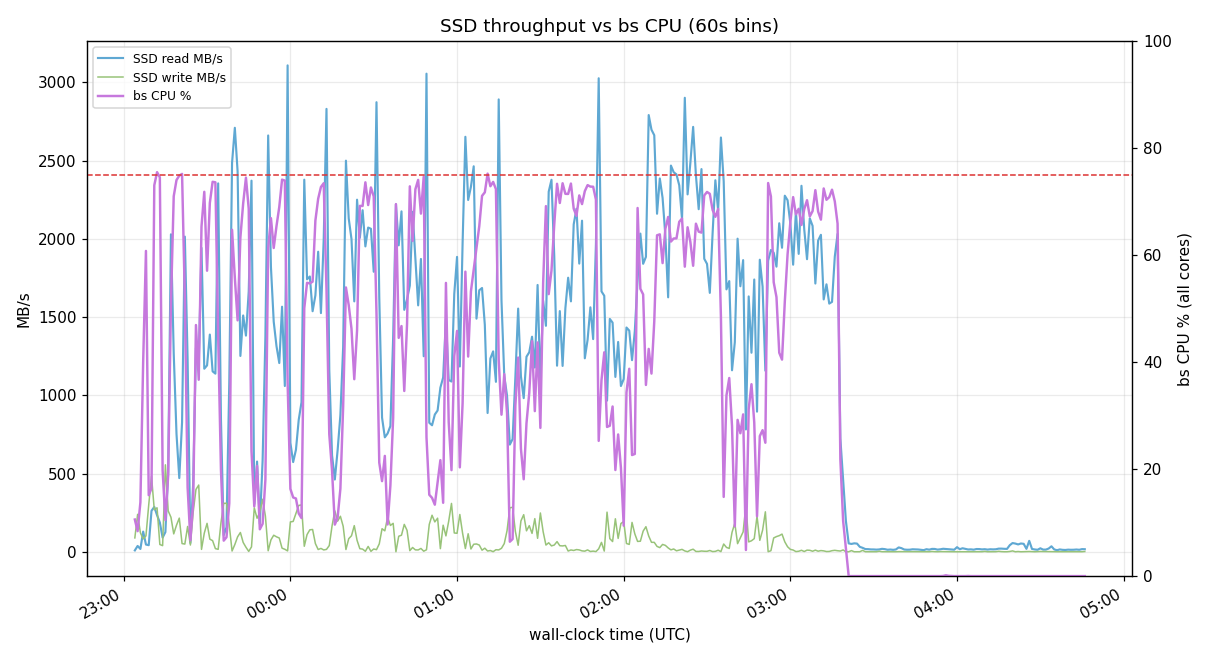
evoskuil04:47
Schnorr is faster per sig than ecdsa. Certainly if it's falling into CPU validation within the batch verify it will be very slow. But the schnorr batches are always much smaller than the ecdsa batches. They are run at the same time based on the first to cross the target (always ecdsa). Also ultrafast batches up the jobs for the GPU, it shouldn't matter how many are fed to it, unless ultrafast has a problem. It's possible that 1M can be slower for these specs, we are still tuning these numbers. But it would be at least as bad or worse for ecdsa than schnorr. Also the lower schnorr batch sizes may give you a lower sps rate.
Kevin Ravensberg04:49
Yeah, Claude thinks it has something to do with extra 15GB RAM for the preallocated tables
evoskuil04:49
It's not the pre-allocation unless you over-allocate. Since they will expand anyway.
(edited)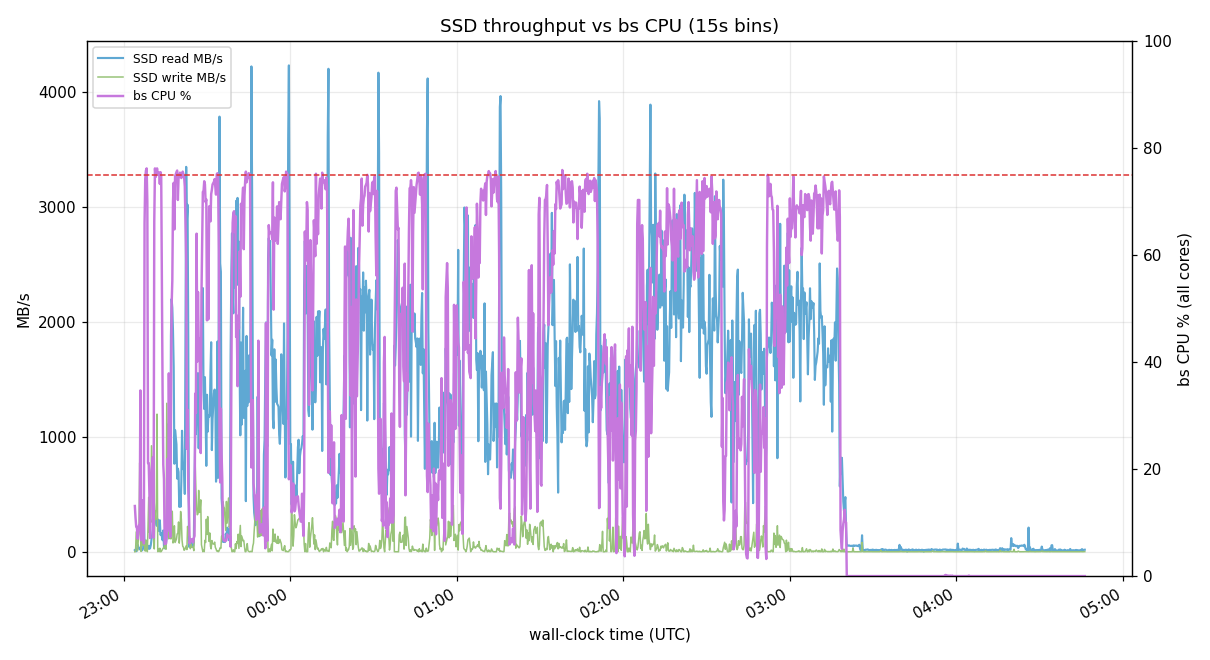
Kevin Ravensberg04:54
Two of his points are checkable, and one of them cuts against his own numbers.
My 15 GB claim does not survive contact with the disk. Retracting it — evoskuil is right.
batch_ecdsa_*    152 MB total   (identity 7, key 37, message 36, signature 72)
batch_schnorr_*  130 MB total
                 ~283 MB, not sparse (apparent == allocated)
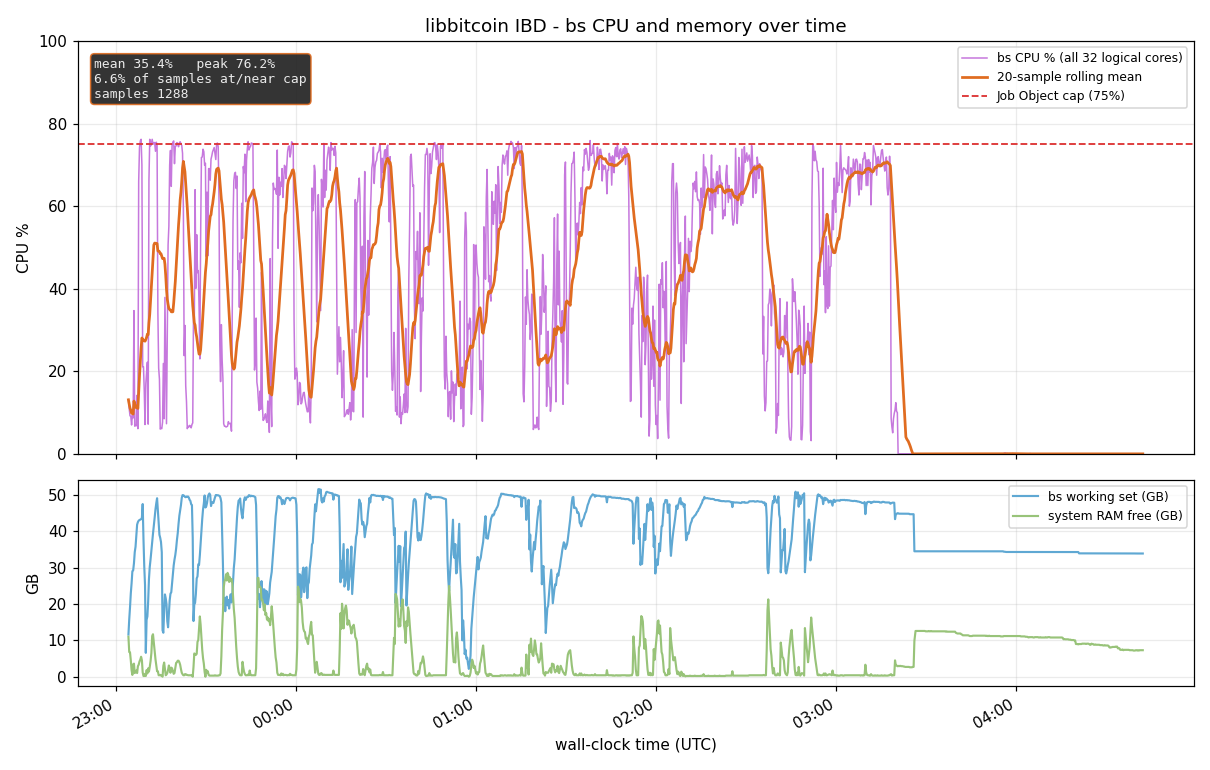
batch_ecdsa_signature.data at 74,573,056 bytes ÷ 64 B/sig ≈ 1.16M rows — i.e. the table settled at roughly the 1M batch target, not the 100M I configured. So ecdsa_size = 100000000 did not translate into 100M rows of resident allocation, and the memory-pressure-from-preallocation theory has no support. The RAM pressure is real (mean working set 39.9 GB, free RAM <2 GB for 48.7% of the run) but it comes from the ~890 GB archive store being mapped, not from the batch tables.
Caveat: those are post-purge sizes, so they bound the resting state, not necessarily the peak.
Re-plotting at 4× finer resolution since he flagged the sampling rate:
Correction to my own earlier figures — they were contaminated by the post-completion idle tail:
Sending the 15s plot, but the numbers matter more — my earlier CPU figures were wrong.
I was wrong about CPU, and evoskuil is closer to right
My earlier stats included 5,115 s of post-completion idle — the node hit maximum_height at 15,406 s but the sampler ran to 20,528 s. Restricted to the actual run:
              contaminated      run window only
bs CPU mean        35.4%              46.9%
       median         —               54.1%
       p90            —               73.7%
       max          76.2%             76.2%
at/near 75% cap     6.6%               8.7%
below 15%          37.6%              17.2%
p90 is 73.7% against a 75% cap. The top decile is pressed flat against the Job Object ceiling, and the median is 54%. So "CPU should be the limiting factor" is much better supported than my earlier reading suggested — and it cannot reach 100% because the launcher caps it at 75%.
My "raising
CpuPercent would buy you very little" was wrong. It is now the single most obvious thing to test.
What is left after that
stall episodes    51   median 30s   p90 135s   max 165s
total stalled     2,520s = 16.4% of the run
free RAM < 2 GB   64.6% of samples
During those stalls reads drop to 266 MB/s while CPU sits under 15% — both quiet, so neither is starving the other. And memory pressure is worse than I reported: nearly two-thirds of the run had under 2 GB free.
Answering his other points
Table pre-allocation — retracted. He is right. On disk the batch tables total ~283 MB, with
(edited)batch_ecdsa_signature.data at ~1.16M rows, i.e. about the 1M batch target rather than the 100M configured. No 15 GB, no support for my memory-pressure theory. Worth noting his own suggested ecdsa_size = 100000000 against batch_signatures = 1000000 is 100× the target, so "size in relation to the batch target" argues for ~1M there.
Schnorr still looks anomalous. His model says schnorr is faster per signature and always the smaller batch, so it should be a rounding error. Measured: schnorr 1,740 s over 1,137 batches versus ecdsa 2 s over 3,111 batches. Smaller batches, faster per-sig algorithm, 870× the total time. If ultrafast were merely slower at 1M it should hurt ecdsa at least as much — it did not, ecdsa actually improved from 11 s to 2 s. That points at the schnorr path specifically rather than at batch size.
...evoskuil04:56
ecdsa_size = 100000000 did not translate into 100M rowsTable sizes are in bytes, not rows.
😅 1
evoskuil05:00
And memory pressure is worse than I reported: nearly two-thirds of the run had under 2 GB free.
That's not worse, that's better 🙂.
💯 1
evoskuil05:01
Measured: schnorr 1,740 s over 1,137 batches versus ecdsa 2 s over 3,111 batches.
How is this measured?
evoskuil05:02
During those stalls reads drop to 266 MB/s while CPU sits under 15%
I think this is referring to downloads, not stalls.
evoskuil05:04
The plots aren't very useful due to the sampling rate. This is what it really looks like.
evoskuil05:23
The above plot is milestone, but at the tail it's full validation (100% CPU). This move in 50k (by default) waves.
(edited)🚀 1