
Bitcoin full node and query server
Oct 11, 2025
View in context in the libbitcoin Slack #general mirror.
E
expatriotic is me17:28
I was building everything manually since the script failed. That also did not work. So trying ./install.sh again without sudo
./install.sh --prefix=$HOME/libbitcoin --build-boost --build-secp256k1 --disable-shared
Why does boost default to 1.89.0 though?
(edited)236 replies · pmienk, evoskuil, expatriotic is me, otto +1 · last Oct 13, 2025

pmienk17:41
The issue is not sudo, but instead the likelihood of an existing installation of boost which does not fully satisfy our requirements but is detected and preferred via the boost/autoconf archive/cmake provided discovery mechanism. A prefix directory explicitly provides a preferred first path of discovery.

evoskuil18:01
It would be nice if Boost could be relied upon to just work across version upgrades, but this is often not the case. There are frequently issues we have to work around and sometimes ones that we cannot. In those cases we hold off supported version updates until they patch.
E
expatriotic is me18:12
Asking for a friend:
"you could ask how to compile the main project without having to install the others.
I compiled the others, but don't want to install them.
If the build process can reference the other directories, nice"
evoskuil18:17
You don't have to install anything, everything builds and into the prefix directory, no sudo required. If you just want to run the node, it's just a single file binary with no dependencies (for the static build).
evoskuil18:18
The node project depends on the other three projects (system, network, database), Those must be built. Also secp256k1 and boost.
pmienk18:25
@expatriotic is me, @evoskuil the install script in each project installs that project and its dependencies. If you just want system, install system. If the issue is installation to the system as a whole, Eric is right, prefix installation scopes where everything lives and allows for placement in paths or not as the user dictates.
👍 1
pmienk18:27
If the goal is development and building instead of installation, this requires a greater degree of sophistication, and I can share my approach on Linux, as can a few others.
E
expatriotic is me18:39
https://bin.ronindojo.io/?639871059b0ec067#J4J11U5gpAbrpzmEtCngCYUoTmQmpFUdjZ9Pm1NRhxXG
mkdir: cannot create directory '/home/me': Permission denied
I've also tried a sandboxed approach [https://bin.ronindojo.io/?6525653b57ed9616#3LH1o2YKdWofngao2pN5NGWe6zwSQCoQt7FmmReYMKo9]... No matter what I do, I can't get it to run the command
bx version
E
expatriotic is me18:41
I'm curious. I didn't see in the documentation what to do after the script finishes to verify if it worked.
Gemini says
nano ~/.bashrc
export PATH="$HOME/libbitcoin/bin:$PATH"
bx version
evoskuil18:43
I'm not sure about your directory create question, but the pastebin is showing that you are building libbitcoin-system from the version3 branch. Is this your intent?
evoskuil18:45
Not if that's what you are trying to build. But I thought you were after the current node build.
pmienk18:46
Trying to create a directory under /home outside a user directory typically requires privileges
(edited)evoskuil18:46
Ok, then you want to get the
install.sh from the libbitcoin-node repo and the master branch.E
expatriotic is me18:47
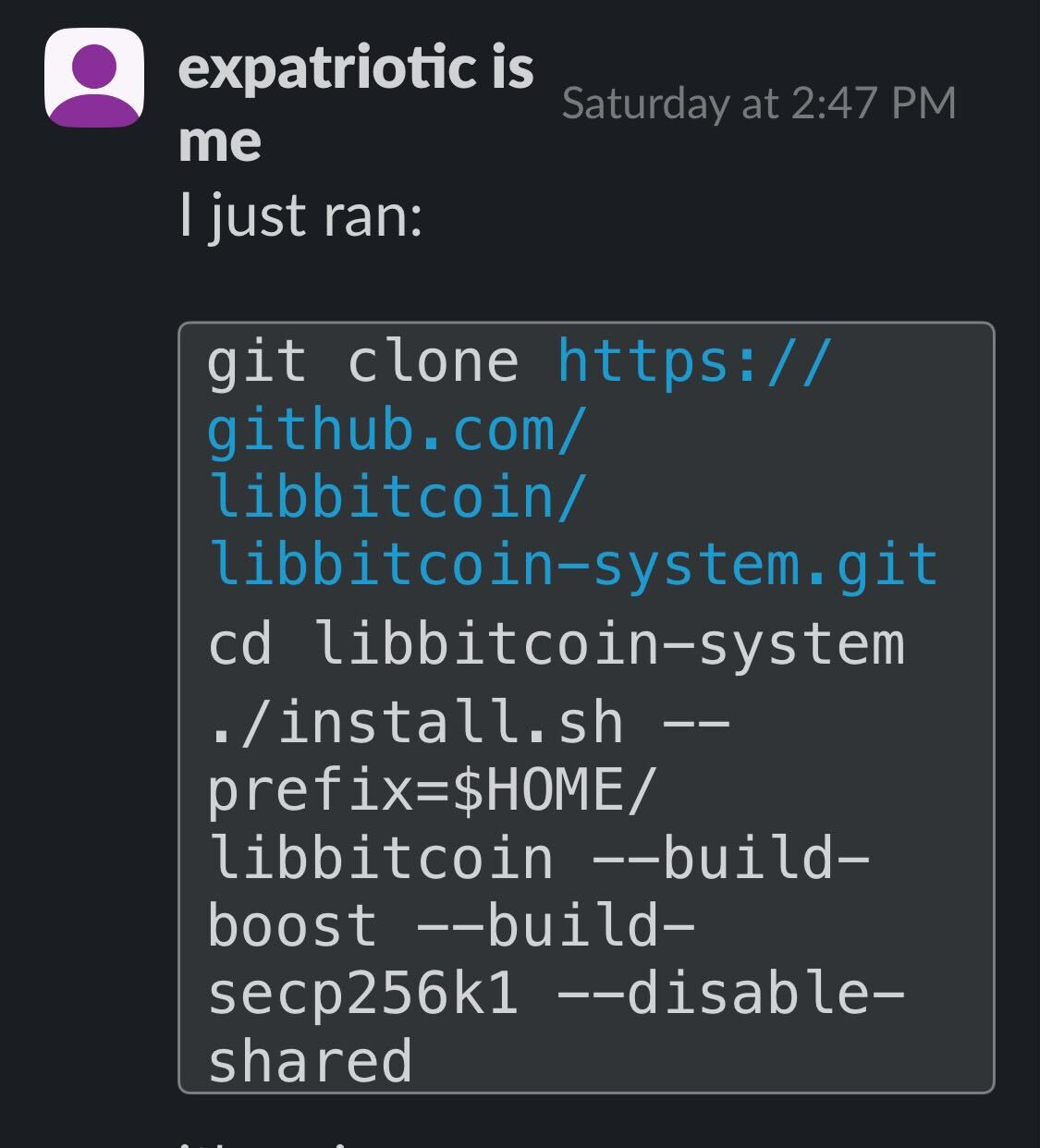
I just ran:
git clone https://github.com/libbitcoin/libbitcoin-system.git
cd libbitcoin-system
./install.sh --prefix=$HOME/libbitcoin --build-boost --build-secp256k1 --disable-shared
evoskuil18:49
libbitcoin-network is the p2p network stack, but has no connection to a database (i.e. can be used by wallets, etc).evoskuil18:50
libbitcoin-node pulls together the other three and builds a chain off the network and stores it in the database.E
expatriotic is me19:18
Version Information...
libbitcoin-node: 4.0.0
libbitcoin-database: 4.0.0
libbitcoin-network: 4.0.0
libbitcoin-system: 4.0.0
E
expatriotic is me19:20
Gemini says now I:
source ~/.bashrc

mkdir -p ~/.config/bitcoin

nano ~/.config/bitcoin/bn.cfg
[database]
directory = /home/satoshi/libbitcoin-data

[node]
network = mainnet

mkdir ~/libbitcoin-data

screen -S node

bn
evoskuil19:21
bn --settings shows all of the current config file settings. you don't need to set any of them.evoskuil19:25
These are runtime options you can type at the console with the node running:
2025-10-11T19:24:23Z.0 Toggle: [a]pplication
2025-10-11T19:24:23Z.0 Toggle: [n]ews
2025-10-11T19:24:23Z.0 Toggle: [s]ession
2025-10-11T19:24:23Z.0 Toggle: [p]rotocol
2025-10-11T19:24:23Z.0 Toggle: [x]proxy
2025-10-11T19:24:23Z.0 Toggle: [r]emote
2025-10-11T19:24:23Z.0 Toggle: [f]ault
2025-10-11T19:24:23Z.0 Toggle: [q]uitting
2025-10-11T19:24:23Z.0 Toggle: [o]bjects
2025-10-11T19:24:23Z.0 Toggle: [v]erbose
2025-10-11T19:24:23Z.0 Option: [b]ackup the store
2025-10-11T19:24:23Z.0 Option: [c]lose the node
2025-10-11T19:24:23Z.0 Option: [e]rrors in store
2025-10-11T19:24:23Z.0 Option: [g]o network communication
2025-10-11T19:24:23Z.0 Option: [h]old network communication
2025-10-11T19:24:23Z.0 Option: [i]nfo about store
2025-10-11T19:24:23Z.0 Option: [m]enu of options and toggles
2025-10-11T19:24:23Z.0 Option: [t]est built-in case
2025-10-11T19:24:23Z.0 Option: [w]ork distribution
2025-10-11T19:24:23Z.0 Option: [z]eroize disk full error
E
expatriotic is me19:32
ts:20250903/
2025-10-11T19:32:02Z.1 Outbound [45.129.99.150:8333] version (70016) /Satoshi:24.99.0/
2025-10-11T19:32:02Z.5 Insufficient services (1032) by [45.129.99.150:8333] showing (67112013) /Satoshi:24.99.0/
(edited)2025-10-11T19:32:12Z.0 CONSOLE: 'bn -d'
2025-10-11T19:32:17Z.1 Outbound [123.100.246.80:8333] version (70016) /Satoshi:29.1.0/
2025-10-11T19:32:17Z.1 Outbound [159.89.121.240:8333] version (70016) /Satoshi:29.1.0/
2025-10-11T19:32:25Z.1 Outbound [203.11.72.30:8333] version (70016) /Satoshi:29.1.0/E
expatriotic is me19:34
hmm... It's running though. Do I open a new terminal window? THis is a screen. I was about to detach and sleep
evoskuil19:35
You can run multiple instances, but they can't share a store. That can be varied in the config file. But this is just a console dump of build info.
E
expatriotic is me19:36
satoshi@ubuntu-bitcoin:~$ bn -d
Hardware configuration...
arm..... platform:0.
intel... platform:1.
avx512.. platform:0 compiled:0.
avx2.... platform:1 compiled:0.
sse41... platform:1 compiled:0.
shani... platform:0 compiled:0.
satoshi@ubuntu-bitcoin:~$
evoskuil19:37
So your hardware supports avx2. Not great because no shani, but better than nothing. You should rebuild with that enabled.
E
expatriotic is me19:38
It's an Optiplex running Proxmox.
So wipe it and redo.
How would I enable
avx2?E
expatriotic is me23:13
Once this is up, I can use as node for Sparrow + my HWW (Passport). I.e., I am not limited to just creating a seed + making txs in the native Libbitcoin CLI interphase. Explorer I think it's called.
bx👍🏻 1
E
expatriotic is me23:49
expatriotic is me
``satoshi@ubuntu-bitcoin:~$ bn -d
Hardware configuration...
arm..... platform:0.
intel... platform:1.
avx512.. platform:0 compiled:0.
avx2.... platform:1 compiled:0.
sse41... platform:1 compiled:0.
shani... platform:0 compiled:0.
satoshi@ubuntu-bitcoin:~$``O
otto00:19
Hey, I was the "friend" he asked about. @evoskuil send me the link weeks ago, but I didn't have the time.
I compiled it yesterday, now will do it again with the CPU flags
O
otto01:08
^^^ Seems to work to detect the flags without having to first compile bn:
grep -Eo "avx5|avx2|sse|sha" /proc/cpuinfo | sort -uevoskuil01:17
It ensures consistency, because there are some subtleties (like multiple variants of avx512, not all of which are sufficient).
✅ 1
E
expatriotic is me01:37
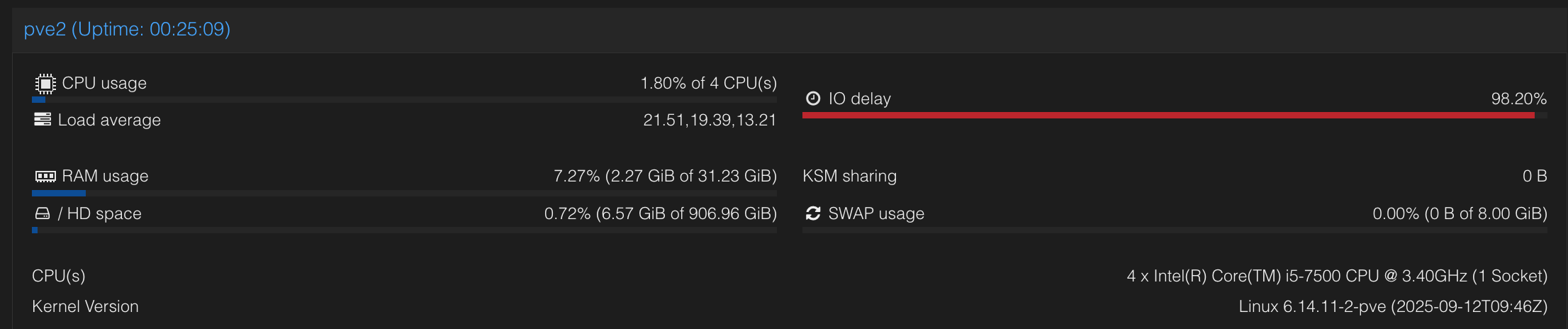
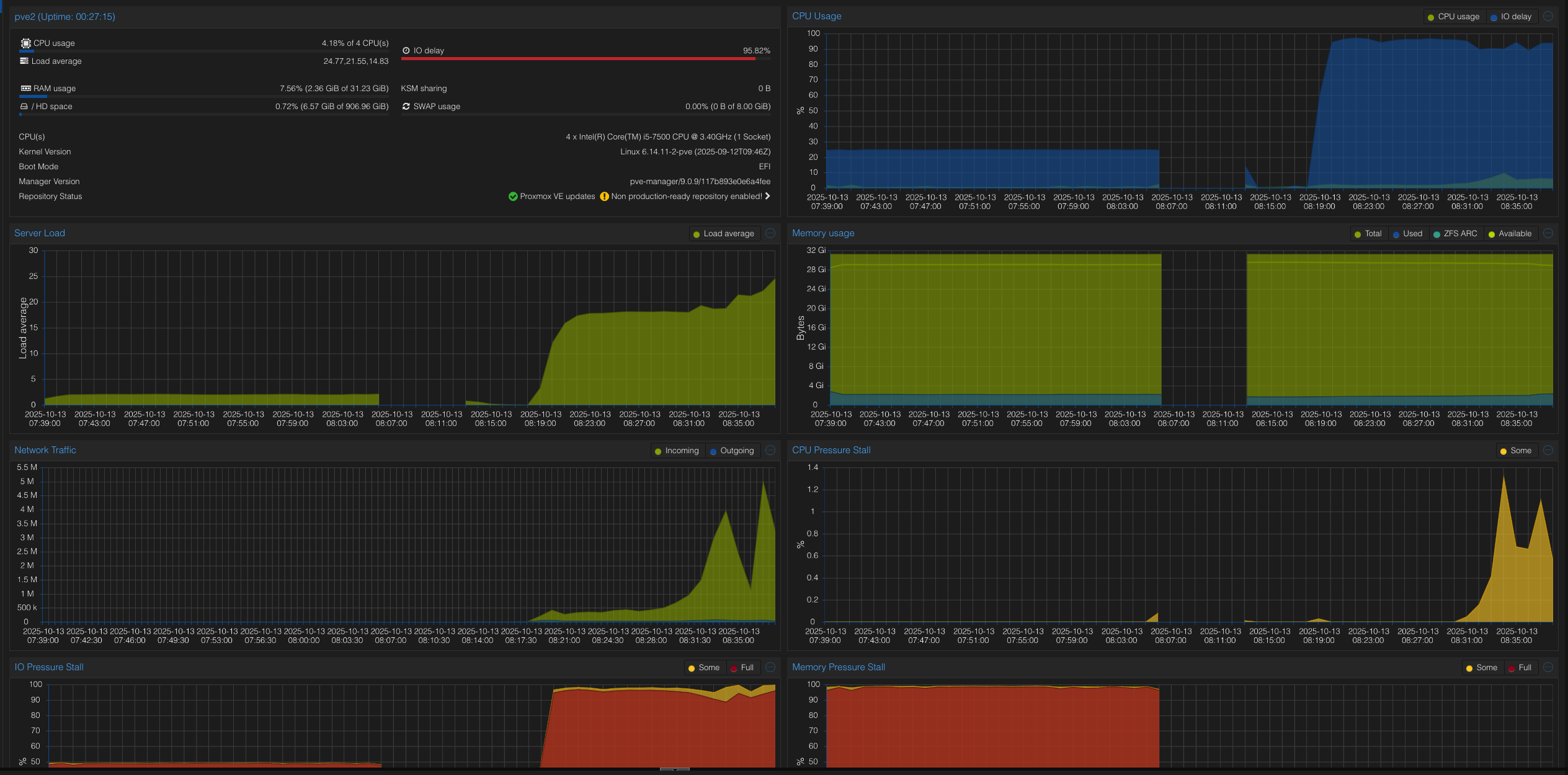
I updated from 8GB which was the arbitrary amount of RAM I had given my LXC "ubuntu-bitcoin"
But now it's gotten worse, it's only 2GB being used. The image is of the proxmox host "PVE2"
E
expatriotic is me01:39
This is what the container is doing
Status
running
CPU usage
0.49% of 4 CPU(s)
Memory usage
3.99% (1.24 GiB of 31.23 GiB)
SWAP usage
0.00% (0 B of 512.00 MiB)
(edited)E
expatriotic is me01:42
Could I sync to my NVME?
root@pve2:~# lsblk
NAME MAJ:MIN RM SIZE RO TYPE MOUNTPOINTS
loop0 7:0 0 2T 0 loop
sda 8:0 0 3.6T 0 disk /mnt/data
nvme0n1 259:0 0 931.5G 0 disk
├─nvme0n1p1 259:1 0 1007K 0 part
├─nvme0n1p2 259:2 0 1G 0 part /boot/efi
└─nvme0n1p3 259:3 0 930G 0 part
├─pve-swap 252:0 0 8G 0 lvm [SWAP]
└─pve-root 252:1 0 922G 0 lvm /
root@pve2:~#
E
expatriotic is me01:42
I have been putting my templates/container etc in NVME and the data itself to the HDD. Is that creating a bottleneck?
evoskuil01:46
I'm not familiar with the environment, but clearly I/O delay is a problem. I don't really know what that's about, but if you aren't running off of an internal SSD your performance will be horrible.
O
otto01:52
FWIW, it was quite simple to compile inside a debian docker container. I just removed --quiet from wget cause it took was taking a while to download boost (I thought I was having VPN connection issues inside docker).
Also had to build secp256k1. I plan to leave this syncing overnight
O
otto02:01
Weird, it failed to find other nodes and stopped:
2025-10-13T02:00:16Z.0 Please wait while network is starting...
2025-10-13T02:00:16Z.1 Candidate top [000000000019d6689c085ae165831e934ff763ae46a2a6c172b3f1b60a8ce26f:0].
2025-10-13T02:00:16Z.1 Fork point (0) unassociated (0).
2025-10-13T02:00:16Z.1 Seeding because of insufficient (0 of 500) address quantity.
2025-10-13T02:00:16Z.1 Connecting to seed [seed.bitcoin.sipa.be:8333]
2025-10-13T02:00:16Z.1 Connecting to seed [dnsseed.bluematt.me:8333]
2025-10-13T02:00:16Z.1 Connecting to seed [dnsseed.bitcoin.dashjr-list-of-p2p-nodes.us:8333]
2025-10-13T02:00:16Z.1 Connecting to seed [seed.bitcoin.jonasschnelli.ch:8333]
2025-10-13T02:00:16Z.1 Connecting to seed [seed.btc.petertodd.net:8333]
2025-10-13T02:00:16Z.1 Connecting to seed [seed.bitcoin.sprovoost.nl:8333]
2025-10-13T02:00:16Z.1 Connecting to seed [dnsseed.emzy.de:8333]
2025-10-13T02:00:16Z.1 Connecting to seed [seed.bitcoin.wiz.biz:8333]
2025-10-13T02:00:16Z.1 Connecting to seed [seed.mainnet.achownodes.xyz:8333]
2025-10-13T02:00:32Z.1 Failed to connect seed address [dnsseed.bluematt.me:8333] operation timed out
2025-10-13T02:00:32Z.1 Failed to connect seed address [seed.bitcoin.wiz.biz:8333] operation timed out
2025-10-13T02:00:32Z.1 Failed to connect seed address [seed.mainnet.achownodes.xyz:8333] operation timed out
2025-10-13T02:00:32Z.1 Failed to connect seed address [dnsseed.emzy.de:8333] operation timed out
2025-10-13T02:00:32Z.1 Failed to connect seed address [seed.btc.petertodd.net:8333] operation timed out
2025-10-13T02:00:32Z.1 Failed to connect seed address [seed.bitcoin.sipa.be:8333] operation timed out
2025-10-13T02:00:32Z.1 Failed to connect seed address [dnsseed.bitcoin.dashjr-list-of-p2p-nodes.us:8333] operation timed out
2025-10-13T02:00:32Z.1 Failed to connect seed address [seed.bitcoin.jonasschnelli.ch:8333] operation timed out
2025-10-13T02:00:32Z.1 Failed to connect seed address [seed.bitcoin.sprovoost.nl:8333] operation timed out
2025-10-13T02:00:32Z.0 Node failed to start with error 'seeding unsuccessful'.
2025-10-13T02:00:32Z.1 Seed session complete.
2025-10-13T02:00:32Z.0 Please wait while network is stopping...
evoskuil02:03
It's not going to keep looping over the seed nodes, so it stops if it fails to get addresses.
O
otto02:06
Is that port (8333) correct for lookup, though? Cause I get many peers without it, but not with it:
libbitcoin$ nslookup seed.bitcoin.sprovoost.nl 2>&1 | grep Address | cut -d' ' -f2
Address:        192.168.1.1#53
45.33.1.178
143.198.210.127
23.28.188.241
213.141.251.4
173.46.87.142
89.106.27.201
45.79.22.148
89.23.119.185
37.182.152.42
73.216.78.94
79.151.229.127
89.106.27.218
155.4.26.146
83.32.167.77
174.140.231.184
98.114.36.130
172.233.151.68
35.242.187.91
170.187.181.164
103.246.186.204
75.82.57.33
47.14.96.94
47.160.10.230
2a05:3580:dc0b:1600:28dc:ab23:609f:8c3
2a00:23a8:83b:2201:dc52:e0c7:9e99:a076
2600:1702:7aa0:10b0:266e:96ff:fe46:9060
2a02:220b:2000:f800:fb46:25d3:84c7:20c0
2a01:6380:fffe:73:10fb:d012:8581:b4d7
2601:84:c900:1b90:be24:11ff:fe8d:f86f
2a11:6100:0:5216::
2003:e7:2f1d:2601:be24:11ff:fe4b:9928
2001:41d0:303:89af::1
2a02:aa10:480:6f00:5ccb:4df0:367f:c503
2804:14d:5c78:82db::1000
2600:1900:40a0:98ea:0:2::
2605:59c2:14ae:2520:20c:29ff:fe23:a4fd
libbitcoin$ nslookup seed.bitcoin.sprovoost.nl:8333 2>&1 | grep Address | cut -d' ' -f2
Address:        192.168.1.1#53
evoskuil02:07
2025-10-13T02:07:33Z.0 Please wait while network is starting...
2025-10-13T02:07:34Z.1 Candidate top [00000000000000000001b7350b4b22eb496c952012d94773bdbb304c1bdda002:918789].
2025-10-13T02:07:34Z.1 Fork point (550718) unassociated (0).
2025-10-13T02:07:34Z.1 Seeding because of insufficient (0 of 500) address quantity.
2025-10-13T02:07:34Z.1 Connecting to seed [seed.bitcoin.sipa.be:8333]
2025-10-13T02:07:34Z.1 Connecting to seed [dnsseed.bluematt.me:8333]
2025-10-13T02:07:34Z.1 Connecting to seed [dnsseed.bitcoin.dashjr-list-of-p2p-nodes.us:8333]
2025-10-13T02:07:34Z.1 Connecting to seed [seed.bitcoin.jonasschnelli.ch:8333]
2025-10-13T02:07:34Z.1 Connecting to seed [seed.btc.petertodd.net:8333]
2025-10-13T02:07:34Z.1 Connecting to seed [seed.bitcoin.sprovoost.nl:8333]
2025-10-13T02:07:34Z.1 Connecting to seed [dnsseed.emzy.de:8333]
2025-10-13T02:07:34Z.1 Connecting to seed [seed.bitcoin.wiz.biz:8333]
2025-10-13T02:07:34Z.1 Connecting to seed [seed.mainnet.achownodes.xyz:8333]
2025-10-13T02:07:34Z.1 Inbound [[2604:2dc0:145:c900::]:8333] version (70016) /Satoshi:29.0.0/
2025-10-13T02:07:34Z.1 Accepted (1000>748>747) addresses from seed [[2604:2dc0:145:c900::]:8333].
2025-10-13T02:07:34Z.1 Seed stop [[2604:2dc0:145:c900::]:8333] seeding complete
2025-10-13T02:07:34Z.0 Node is started.
2025-10-13T02:07:34Z.1 Accepting 100 peers on 2 bindings.
O
otto02:13
yeah, found it weird that was the output when port 8333 was used.
Getting many peers now
👍🏻 1
O
otto02:29
Is there a way to track progress? All I see is a lot of messages about outbound peers being connected to
O
otto02:29
Also, is it expected to have the computer close to unusable while during this initial sync?
evoskuil02:31
Yes, the sync is intended to be fast. If you want it to be slow you can reduce the thread count and/or priority. It will use whatever resources the OS gives it. It's the job of the OS to keep the computer responsive, not applications running on the computer.
evoskuil02:32
I can sync the entire chain in < 60 minutes on my 9 year old windows PC and keep working like nothing's happening.
evoskuil02:34
Both over limit resources and kill processes when there are plenty of resources, and also fail to fair allocate them when they are sparse.
evoskuil02:35
You can request info at the console, and also vary the level of console/log output.
m <enter> for the options.evoskuil02:36
But there is also a high speed event log, which puts out readable events. That's easiest for just tracking block progress. Keep in mind that blocks are downloaded and validated out of order (concurrently).
(edited)O
otto02:37
right, it works. I didn't see anything echoed after I typed
i, didn't realise i had to type enter tooevoskuil02:40
The <i>nformation option is a little hard to pick apart, it's really for us to get insight into store logical behavior.
evoskuil02:42
header_organized.... 918318 27704
header_archived..... 918319 27982
header_organized.... 918319 27982
header_archived..... 918320 29198
header_organized.... 918320 29198
header_archived..... 918321 29250
header_organized.... 918321 29250
evoskuil02:42
block_organized..... 899992 4062
block_confirmed..... 899993 4062
block_organized..... 899993 4062
block_confirmed..... 899994 4062
block_organized..... 899994 4062
block_confirmed..... 899995 4062
block_organized..... 899995 4062
block_confirmed..... 899996 4062
block_organized..... 899996 4062
block_confirmed..... 899997 4062
block_organized..... 899997 4062
block_confirmed..... 899998 4062
block_organized..... 899998 4062
block_confirmed..... 899999 4062
block_organized..... 899999 4062
block_confirmed..... 900000 4062
block_organized..... 900000 4062
evoskuil02:44
If we spit out these entries to the console we'd spend more time writing the console than syncing the blocks.
O
otto02:45
block_organized..... 150070 1534
block_validated..... 150071 1536
block_confirmed..... 150071 1536
block_organized..... 150071 1536
block_validated..... 150072 1536
block_confirmed..... 150072 1536
block_organized..... 150072 1536
evoskuil02:47
block_archived...... 150070 85
block_validated..... 150070 85
block_confirmed..... 150070 85
block_organized..... 150070 85
evoskuil02:57
VPN and wifi both, prob rough.
Also on Linux you probably won't get close to full RAM access, probably limited to like 6-7GB. To get full access to the RAM you need to set something like this:
sudo sysctl vm.dirty_ratio=80
sudo sysctl vm.dirty_background_ratio=50
sudo sysctl vm.dirty_expire_centisecs=6000
sudo sysctl vm.dirty_writeback_centisecs=1000
evoskuil02:58
That will make a big difference. Apart from your network speed, it should perform well given your specs.
O
otto02:58
It seems the SSD is PCIe4, not sure about the motherboard. Will try to measure speed, the computer is a little slow
evoskuil03:04
We can't go any faster than the theoretical limit (wire serialization bytes / DL bandwidth). :)
evoskuil03:14
But anything less than 32GB is not a target platform for us, so when you're limited to < 6GB (or even < 24GB) it just thrashes.
(edited)E
expatriotic is me04:31
Same, mine went to less RAM after fiddling with it. Can't be the storage disk as that factor didn't change. Gonna remove these settings from sysctl.conf:
sudo sysctl vm.dirty_ratio=80
sudo sysctl vm.dirty_background_ratio=50
sudo sysctl vm.dirty_expire_centisecs=6000
sudo sysctl vm.dirty_writeback_centisecs=1000
evoskuil05:08
Contact @eynhaender to see what he thinks. This has worked consistently, but it's been his project.
E
expatriotic is me08:38
I.e., have I just made my HWW useless? And I'd need to make the seed hot to spend? Likewise with my hot wallet Ashigaru, Dojo is built with Core in mind. Just want to understand for myself and others, what they can do with this tech, as cool as it is, if people don't build on it... 👀
TBH, this will be my first node. I ran a rockpine POS with dojo, but fulcrum was buggy and would corrupt a lot. And I moved behind the great firewall of china where tor is unusable for nodes... So if this node gets stood up, it'll kind of be my first. Been borrowing other peoples nodes to power my wallets
evoskuil08:38
It can’t be paired with anything except code presently, as the client-server interface is a work in progress. Bx will also work with it when it’s updated. The client server interface will have Electrum, json-rpc and stratum compatibility modes, as well as a full REST API and block explorer.
E
expatriotic is me08:46
Okay, thank you for clarifying. That makes perfect sense.
So for a non-developer like me, once the node is fully synced, what is the immediate, practical use case? It feels like I've successfully built a powerful backend/dev-kit, but I'm trying to understand what I can do with it today from a user's perspective, before the new client-server interface is ready.
E
expatriotic is me09:32
checking for libsecp256k1 >= 0.1.0.20... no
configure: error: libsecp256k1 >= 0.1.0.20 is required but was not found.
real 2m7.815s
user 3m30.237s
sys 0m29.384s
satoshi@ubuntu-bitcoin:~/libbitcoin-node$ ./install.sh --prefix=$HOME/libbitcoin --build-boost --disable-shared --enable-avx2 --build-libsecp256k1
E
expatriotic is me09:33
But I nuked the container and now it hangs asking for it. So I added the flag... Still halting saying it is needed
E
expatriotic is me09:34
Rebuilt the container to use the 1TB SSD and all the RAM... but now stuck on the build again
O
otto14:17
maybe it you installed it from apt in the previous attempt. On Debian I had to build it as the default repo doesn't have that version

eynhaender14:58
These are lots of different setups now tbh. I am working on 3 different Ubuntu machines simultaneously, 2 with 32 GB and one with 96. 2 different Kernels, all different CPUs and SSDs. Then you have different binaries too (release, debug, other flags). What I want to say that it's hard to tell from here which aspect leads to limiting RAM on your @otto machine. I also don't know anything about what will happen to mem usage/disk access in containers or VMs. I'd absolutely love to know more about it though 🙂
You can absolutely drop me a line to look into your issues and I'll have a look at it when possible.
O
otto15:22
Just a feedback on the progress, it looks extremely slow here:
block_organized..... 851185 43022
block_organized..... 851189 43487
block_organized..... 851190 43570
block_organized..... 851552 44175
block_organized..... 852078 44226
(edited)
evoskuil15:55
That seems backwards. It will start full validation above the configured milestone block, which is 900,000 by default. This will be significantly slower. I think what you are seeing is much higher CPU utilization, not faster completion.
O
otto15:58
Hmm right, it's "stuck" on 900.989 now.
CPU usage's been high all this time, unlike RAM (4-7GB most)
evoskuil15:59
This times above are very slow
One second...
block_organized..... 898291 3862
block_confirmed..... 898292 3862
block_organized..... 898292 3862
block_confirmed..... 898293 3862
block_organized..... 898293 3862
block_confirmed..... 898294 3862
block_organized..... 898294 3862
block_confirmed..... 898295 3862
block_organized..... 898295 3862
block_confirmed..... 898296 3862
block_organized..... 898296 3862
block_confirmed..... 898297 3862
block_organized..... 898297 3862
block_confirmed..... 898298 3862
block_organized..... 898298 3862
block_confirmed..... 898299 3862
block_organized..... 898299 3862
block_confirmed..... 898300 3862
block_organized..... 898300 3862
block_confirmed..... 898301 3862
block_organized..... 898301 3862
block_confirmed..... 898302 3862
block_organized..... 898302 3862
block_confirmed..... 898303 3862
block_organized..... 898303 3862
block_confirmed..... 898304 3862
block_organized..... 898304 3862
block_confirmed..... 898305 3862
block_organized..... 898305 3862
block_confirmed..... 898306 3862
block_organized..... 898306 3862
block_confirmed..... 898307 3862
block_organized..... 898307 3862
block_confirmed..... 898308 3862
block_organized..... 898308 3862
block_confirmed..... 898309 3862
block_organized..... 898309 3862
block_confirmed..... 898310 3862
block_organized..... 898310 3862
block_confirmed..... 898311 3862
full file
evoskuil16:02
The reason CPU has been high is that the low RAM is causing thrashing, which is occupying all of the CPU time.
O
otto16:02
I assume CPU usage will slow down a lot after this initial sync?
Not sure if it has an "IBD mode" like Core
evoskuil16:04
It takes 16GB to hold the table heads, which should remain memory resident. So most of the time is spent just moving these on and off the disk.
evoskuil16:05
That's fine when it's only processing a few hundred blocks, but not when it's got 900k to work on.
evoskuil16:06
It's some Linux (and macOS) configuration issue. It was unresolved for a long time, but recently we are able to match Windows performance on Linux.
👍 1
evoskuil16:15
If you wanna see what it should look like on your specs, you are welcome to try out a windows build.
O
otto19:14
Sure.
I'll post it later on X and ping you. Also how I built it. There are more people willing to try, but they don't know how to do it
evoskuil19:16
People who are diligent and technical enough to seek us out and go through the process provide good input to the process. But the masses are another story at this stage.
(edited)✅ 1
eynhaender19:45
I will adapt the README.md over the next days. Then we will see if it can cover enough obstacles for the very early adopters to not get frustrated while playing around. Keep you posted.
🔥 1
O
otto20:14
Trying to build it on arch to compare, but the script is failing.
(edited)./install.sh --prefix=$HOME/libbitcoin --build-boost --build-secp256k1 --disable-shared --enable-avx2 --enable-shani --enable-sse41
On this call:
create_from_github bitcoin-core secp256k1 v0.7.0 yesO
otto20:14
Inside the function there is:
push_directory "$BUILD_SRC_DIR"
this variable isn't assigned anywhereevoskuil20:18
You already ran on arch, where you build it doesn’t matter. The install/build isn’t tested on Arch, just Ubuntu/Debian, so there are likely issues.
O
otto20:20
I found a couple unrelated issues with the script:
    if [[ DISPLAY_VERBOSE ]]; then
        VERBOSITY="VERBOSE=1"
    fi

    SEQUENTIAL=1
    # Avoid setting -j1 (causes problems on single threaded systems [TRAVIS]).
    if [[ $JOBS > $SEQUENTIAL ]]; then
        make -j"$JOBS" "$@" $VERBOSITY
    else
        make "$@" $VERBOSITY
    fi
DISPLAY_VERBOSE is missing the $
> doesn't work for numbers, AFAIK. Should be -gtevoskuil20:25
Running it on Arch vs. Debian may make a difference. The issue is the OS management of mmap paging.
👍 1
O
otto21:05
@pmienk I'm curious, what is this
(edited)BUILD_SRC_DIR? It's not mentioned anywhere elsepmienk21:18
An artifact of writing codegen for 4 install scripts and attempting to maximize common code use. I'm testing rename of BUILD_DIR to BUILD_SRC_DIR to confirm working fix, as BUILD_DIR for install.sh/install-cmake.sh/install-cmakepresets.sh are meant to be for end users and so don't distinguish src/obj directories while developer_setup.sh does.
pmienk21:19
oddly enough, i don't see a failure in CI, so I'm curious if it's defined in a way I don't remember offhand.
👍 1